



If you are a frequent user of Gmail and connect with him on many computers, either for personal use or for work, then they may forget to log out from your account from a computer that you're no longer in front of him. Do not worry because you may well be disconnected remotely.
And in fact you can disconnect remotely even if you no longer have access in that particular box. This situation can prove vital if your laptop or mobile phone and you want to disconnect it gmail you immediately. Fortunately, the Google gives a very simple way to log out of your account remotely. Let's see how:
1. Sign in to your Gmail account from any computer and any web browser and scroll down to your inbox.
2. Locate and click on choice “Details” just below “Recent Account Activity” (Last account activity).

3. The "Activity Info" window will appear. Click the Sign out of all other web sessions.
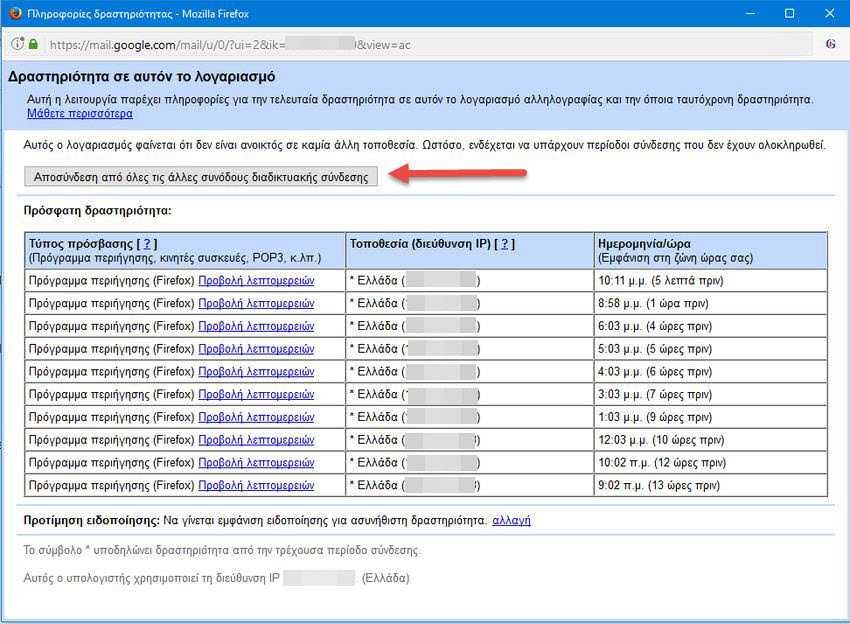
In the same window you can also see a list of devices and IPs through which you have signed in to your account. This will help you examine whether there is any activity that you do not know about and that you have previously made an entry or have installed a related application.

