

The Discourse backup process is extremely simple and efficient, as Discourse has one of the best built-in backup systems.
Here are the key points you need to know to secure your forum :
What does Backup include (and NOT include)?
• Includes: The entire PostgreSQL database (users, topics, replies, private messages, settings) and optionally all uploaded files and images. The final file is in .tar.gz format.
• Does NOT include: The application code and plugins. These are defined in your server configuration file (app.yml).
• The “Golden Key”: To restore your forum from scratch to a new one server, you only need two things: the backup .tar.gz file and the app.yml file.
Storage Location: Local and Cloud
By default, backups are stored locally on the server. However, if something happens to the server, you will lose everything.
Below we will see how you can connect Discourse to an external cloud service like AWS S3, such as Cloudflare R2, Backblaze B2, or DigitalOcean Spaces. Discourse will automatically send your backups there, giving you peace of mind.
You can configure Discourse to store backups on Cloudflare R2 using Discourse's built-in S3 compatibility settings.
Basic Settings (in app.yml)
Connect to your server via SSH and edit the configuration file:
cd /var/discourse
nano containers/app.yml
To connect Cloudflare R2 as an S3 destination for backups or uploads, add the following parameters to the Discourse app.yml file:
DISCOURSE_USE_S3: true
DISCOURSE_S3_REGION: "auto"
DISCOURSE_S3_ENDPOINT: "https://.r2.cloudflarestorage.com"
DISCOURSE_S3_ACCESS_KEY_ID: "το-r2-access-key-id"
DISCOURSE_S3_SECRET_ACCESS_KEY: "το-r2-secret-access-key"
DISCOURSE_S3_BUCKET: "discourse"
DISCOURSE_S3_BACKUP_BUCKET: "discourse"
DISCOURSE_BACKUP_LOCATION: "s3"
Important details and limitations:
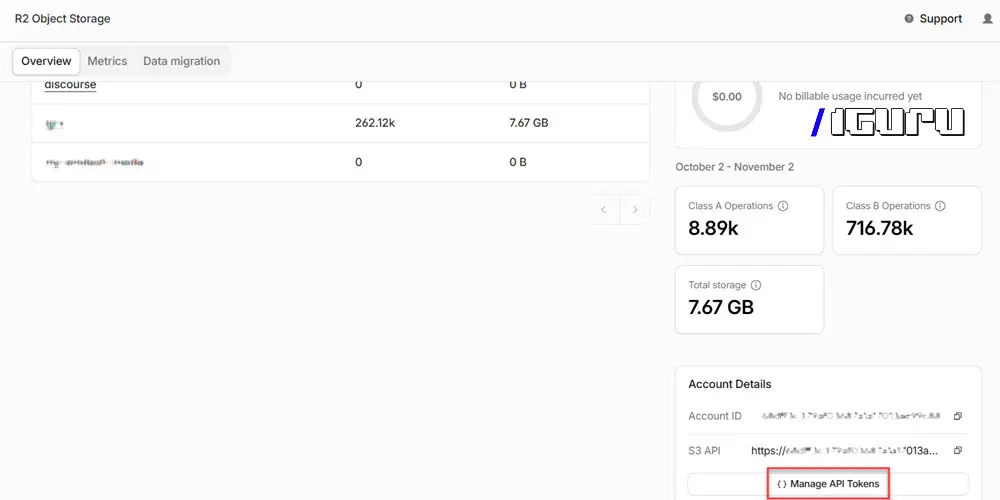
• S3 API Keys: In Cloudflare R2 , you create an API Token with Object Read & Write permissions on the specific buckets (discourse-uploads and discourse-backups). You can do this from Manage API keys as shown below.
• File compatibility: Although there were historical issues with handling compressed files (.tar.gz) in R2, Cloudflare has improved S3 API compatibility and Discourse backups upload fine in R2.
• Uploads to backups: If you are using R2 for image/media storage, please note that uploads already in S3/R2 are not included in basic database backups by default unless the relevant setting DISCOURSE_INCLUDE_S3_UPLOADS_IN_BACKUPS: true is enabled (which may increase download time and size).
Creating R2 API Tokens on Cloudflare
1. Log in to the Cloudflare Dashboard.
2. In the left menu, select R2.
3. On the right side of the screen, click the Manage API Keys link.
4. Click the Create API Token button.
5. Configure the Token as follows:
• Token name: Type a name (e.g. discourse).
• Permissions: Be sure to select Object Read & Write.
• Bucket scoping: Select All buckets or specifically select the bucket you created for Discourse.
6. Click Create API Token.
7. Copy the following items immediately (they will not appear again):
• Access Key ID (Corresponds to DISCOURSE_S3_ACCESS_KEY_ID)
• Secret Access Key (Corresponds to DISCOURSE_S3_SECRET_ACCESS_KEY)
• AccountID (Appears on the same page, required for Endpoint URL)
Rebuild of Discourse
To apply the changes and read the new environment variables, you need to rebuild the container:
./launcher rebuild appThis was your first backup attempt.


0 reviews
iGuRu.gr