

PhotoCraft is an open source, cross-platform image editor written in Rust. The application is part of a series of creative tools developed by ArtCraft TECHNOLOGY, under the guidance of Brandon Thomas, former CEO of storyteller.ai.
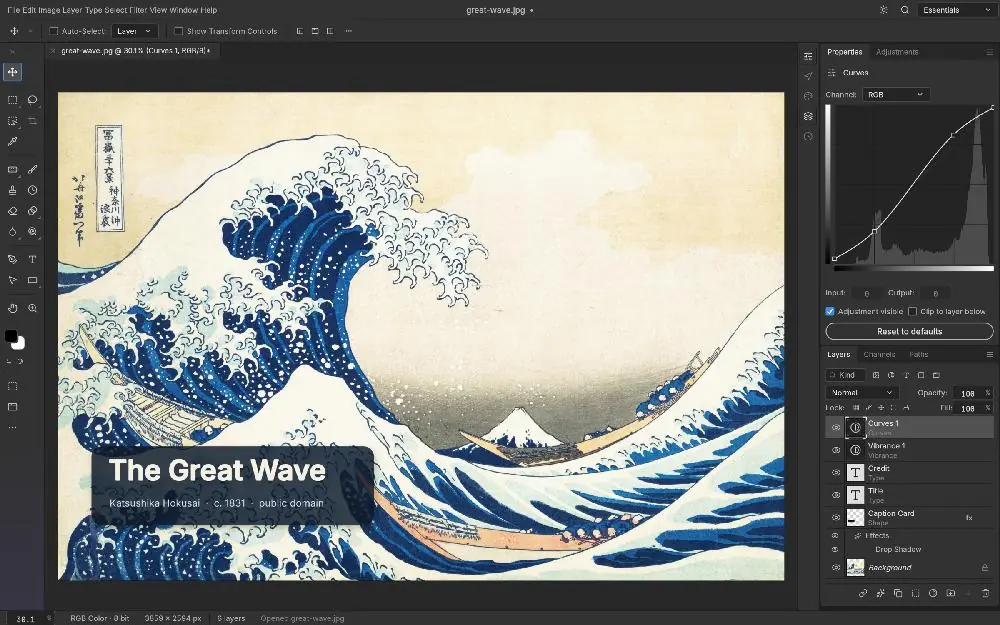
ArtCraft presents the application as a “ clean-room reimplementation of Adobe Photoshop,” thus avoiding any copyright issues, as it does not rely on reverse engineering of material that is not publicly documented — something that will surely please fans of open source software (FOSS).
In terms of features, PhotoCraft is already feature-rich, despite being in alpha. It has layers, masks, layer styles, smart objects , a brush engine, and more. It also includes 34 tools, 27 blend modes, and various filters, and supports opening and saving files in Adobe's .psd format.
It also copies the menu layout, keyboard shortcuts, and tools of the original program, as the idea is that users familiar with Photoshop can switch to PhotoCraft and continue their work without any problems.
GPU acceleration is implemented using Vulkan on Linux, Metal on macOS, and DX12 on Windows (or WebGPU in the self-hosted WebAssembly version). The app also has a ton of interfaces for AI agents, allowing them to “use” the app as well.
It boots incredibly fast and is responsive. Of course, RAM usage spikes to 5GB a few minutes after opening a PSD file, just like real Photoshop!
Why was it created?
According to what he posted on Reddit, Thomas' initial motivation for creating a clone of Adobe products was the excessive charges, obstacles, and general disparaging behavior he encountered when canceling his Adobe subscription.
It should be mentioned that it will not replace Photoshop for professionals (yet)….
I'm quite familiar with Photoshop and was initially skeptical of the idea of a clone app. But PhotoCraft comes pretty close to the actual UI and UX of Photoshop - much more so than the "make GIMP look like Photoshop" attempts.
However, this is a superficial similarity. In this sense, it is reminiscent of PhotoPea, the free online Photoshop clone that has been around for many years (it was created by a human, before the age of artificial intelligence).
Having similar functions, in similar places, and with similar names or icons, is not the same as having them work or produce exactly the same result. While this program comes impressively close to the look of Photoshop, it is far from offering the same user experience.
Adobe has spent decades perfecting blending modes, filters, content-aware tools, and object detection and defect removal algorithms. Clones can follow public specifications and adapt based on observed behavior, but they can't reproduce the exact same result.
It matters;
It depends on how well you know Photoshop.
Casual users who do basic editing won't notice a difference. For this category of users, there are already many image editing programs with Photoshop-like capabilities – Affinity, for example, runs fine on Linux via Wine.
For professionals, PhotoCraft's shortcomings, errors, differences in the final result, and all these "invisible" details may seem insignificant when considered individually, but in the everyday workflow, their sum matters.
Perhaps this is a clone created with honest intent, or perhaps it is a show of power that acts as a “raised middle finger” towards a particular company.
https://github.com/storytold/photocraft

0 reviews
iGuRu.gr