



For those of you who own a Windows laptop, you have the ability to customize what the portable your computer when you close the lid.
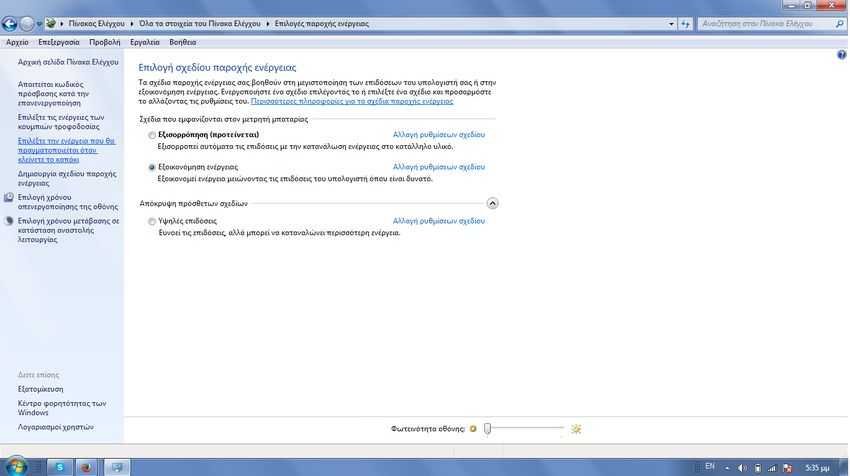
This feature is part of them Windows of the earlier versions. Most users have not perceived and have not touched this setting, which by default is to put the computer into sleep.
If, however, you prefer the system to behave differently and specifically if you want a faster way to shut down your Windows, then you can shut down Windows by simply closing the lid on your laptop. This, of course, only works for laptops rather than desktops, since Windows understands what kind of machine you have and does not display this feature on desktop computers.
Note that you do not need administrator privileges for the following setting. If you have configured many users in laptop you can configure the operation of your laptop's lid separately for each user.
1. Right click on its icon batterys in the notification area. Select “Power Options” from context menu. Alternatively you can go to “Power Options” and through the “Control Panel”. In the left column, select "Choose the action to take when you close the lid."
2. In the next screen, you will see the options you have in the power supply, specifically the switch on-off, on the shutdown switch and on the laptop cover. You can set a different action when your laptop is running on battery power and a different one when it is plugged in.
Open the drop-down menu next to "When I close the lid". Select "Shutdown" in both "Battery" and "Plug in" box.

3. Click 'Save Changes' to apply the change. When you close the lid on your laptop, Windows will start shutting down. Windows will not force the system to shut down. If you have any applications that are still running, Windows will exit and then shut down the system. It is likely that an application prevents it from closing. It is also possible that Windows will shut down your applications and you will lose any unsaved work. There is a risk and it is best to take care of saving your jobs before closing the lid on your laptop.
If you're getting used to closing your laptop's lid when you get out of your office, then this is not a wise choice. If, however, you close your laptop's lid only at the end of the day, then this is one of the fastest ways to shut down Windows.

