

A free tool eliminates unnecessary Microsoft bloatware , frees up RAM to levels you've never seen before , and transforms your PC's speed in minutes!
Towards the end of July, Microsoft confirmed that he is working on improving memory management in Windows 11, however, clarifying that the optimization will mainly concern systems with 8GB of RAM or more. In this way, it indirectly but clearly admitted that users with 4GB of memory will struggle with Windows 11, despite the fact that the system requirements remain unchanged, as a minimum of 4GB of RAM is still required.
Microsoft released Windows 11 build 26H2 in late September . If your system doesn't officially support Windows 11 26H2, you can proceed with the installation using third-party applications, such as Ventoy , which help bypass the requirements (although some requirements, such as internet connection and Microsoft account/MSA, may not be bypassable).
Another very popular alternative is Rufus . In May, with version 4.14 , the program gained a new feature that allows users to get rid of unnecessary software (bloatware) of Windows 11. Through a new option to improve the user experience, it is possible to disable Microsoft applications such as Teams, Outlook and Copilot — among others — that often start automatically when the device is turned on.
Recently, a user used Rufus 4.15 to install Windows 11 build 26H2 on a relatively inexpensive desktop PC with an AMD Ryzen 5 3500 (Zen 2) processor and 16GB (2x8) DDR4-2133 RAM. Looking at Task Manager, he noticed very low memory usage on the Windows 11 26H2 system thanks to Rufus, although it is possible that the memory optimizations mentioned at the beginning also contributed to this.
What does the user say in X?
“I used Rufus to delete all the bloatware, installed version 26H2, and Win11 memory has been reduced to levels I've never seen before”
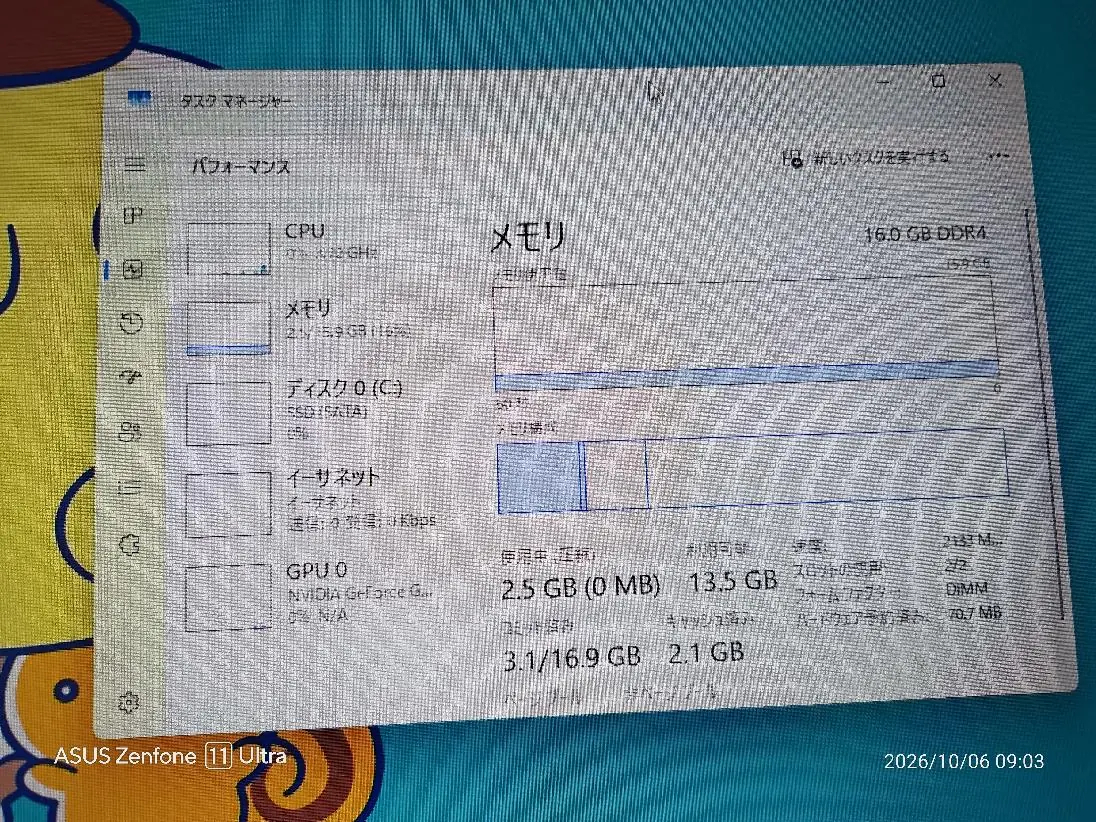
The user was obviously thrilled, as he noticed that his computer was only using 2,5 GB of the total 16 GB. Furthermore, he had no problem with Windows caching, as 2,1 GB remained in the cache. Therefore, using the system in this state must have been very smooth.
You can use Rufus version 4.15 if you want to try out the new Quality of Life feature.



0 reviews
iGuRu.gr