



Google has just built its contact section gmail and Google+ and people have already begun to complain about the new feature.
Well, do not panic, there is a way out of this whole feature, since Google seems to always provide an alternative for those features that affect privacy.
What should you do? First of all, there is a chance that the new feature will not appear in your account, so you should check it or otherwise the opt -out will not be available to you.
In order to check, you should open a new composition window and type one letter or two in the “To” field. Email addresses you have in contacts should appear as suggestions. If you already have the new feature, you'll also see it under your contacts gmail, a new section where Google+ contacts appear.
If it does not appear, you should wait until the new changes are applied. In addition, you are supposed to receive an email from Google that tells you about the new feature.
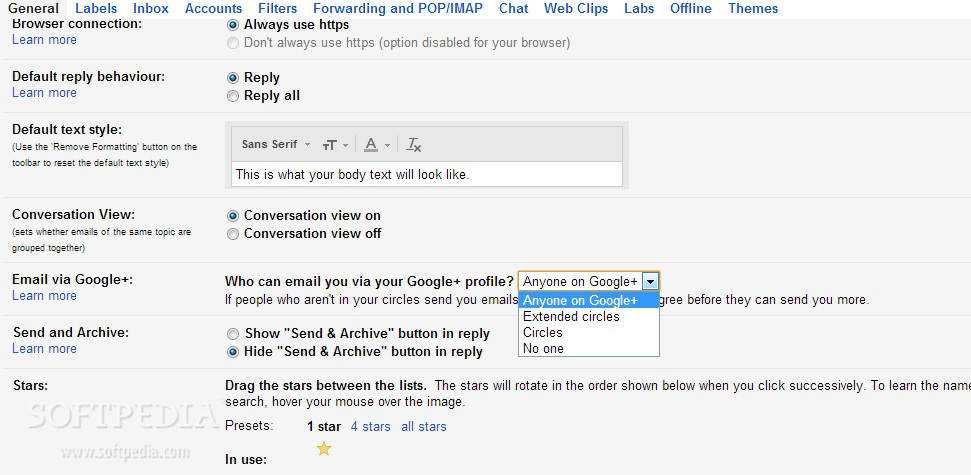
Regardless of the above, you'll need to go to the "General" Gmail settings area and scroll until you find a new section called "email via Google+."
From a drop-down menu, you can choose who can email you through your Google+ profile. You have four options to choose from. The “Anyone on Google+” option provides minimal privacy protection and is, unfortunately, the default selection.
"Extended circles" means you can be informed by people in your circles and people in their circles. The third option, "Circles," enables your Google+ friends to contact you.
If any of these choices do not match you, you can choose the fourth "No One" option, which lets no one contact you through your Google+ profile.

