


Tired of Skype banner ads that appear on the right side of your chat window? There's a simple method to disable them, which works regardless of the version of Windows you have.
No more than 6 simple steps to do ....... we start:
- Go to Control Panel (if you do not know how, then press the Win and X buttons together and in the new window that will open select "Control Panel")
- Locate and open the item: Control Panel -> Internet Options [Control Panel -> Network and Internet -> Internet Options].
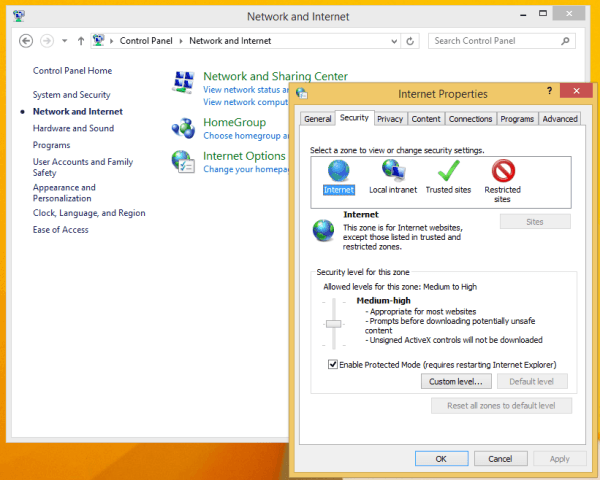
- Go to the Security tab.
- Click the "Restricted sites" icon and click the "Sites" button: The "Restricted sites" dialog box will appear on the screen.
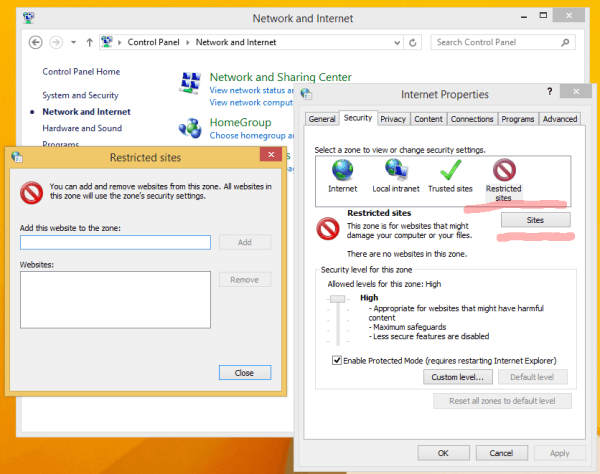
- Type the following in the text box, and then click the "Add" button:
https://apps.skype.com/ - Close Internet Options and restart Skype.
That's it! Enjoy Skype without ads in its chat.



Good and very useful! Thanks !